// Automate

That thing your team does
every day by hand?
There's a good chance a computer can do it for them.

If someone at your business is spending hours on a repetitive task — copying files, running reports, moving data — there's a good chance a computer can do it for them. Small business automation and automating office tasks doesn't require an IT team. Automatically. Every day. Without being asked.

See How It Works Set It Up in Minutes →

Three steps. No IT department needed.

You don't want to understand the technology. You just need to know what you want to stop doing manually.

01

Tell us what's eating your time

Pick the task you want off your team's plate. Moving files, syncing folders, running reports, cleaning up old data — choose from the most common ones or describe your own.

No jargon. Plain English throughout.
02

Tell us when and where to run it

Set the schedule — daily, weekly, whatever fits your operation. Point us at the right folders or scripts on your computer. That's it. You don't need to know how any of it works under the hood.

Takes about five minutes.
03

It runs itself from here

Suretek sets up your account and sends you a small installer. Run it once on your computer and your task starts running on schedule — every time, without anyone touching it.

One install. Runs in the background.

Four things we set up most often.

These cover the majority of what small and mid-sized businesses ask us for.

Move files to storage

Completed files move from your active folder to your archive or backup location automatically — on your schedule.

Keep folders in sync

Two locations — two computers, a computer and a server, or a local and a backup drive — stay identical without anyone copying files.

Clean out old files

Files older than a date you set get removed automatically. Your drives stay clean without anyone going in to do it manually.

Run a report and email it

A script runs on schedule and the output lands in someone's inbox automatically — daily, weekly, or monthly.

Your team stops doing it.
It just happens.

Once it's set up, you don't think about it again. It runs in the background on your computer while your team focuses on work that actually needs a human.

No one has to remember to do it
No one has to stay late to get it done
If something goes wrong, you get an alert — nothing silently fails
You can see everything that's running from one place
Add more tasks any time without starting over
Set Up Your First Task →

A scheduler account that's yours.
Not a one-time fix — an ongoing tool.

When you go through the wizard, Suretek sets up a private Scheduler account for your business. You get a dashboard where you can see every task that's running, check results, get alerted if something fails, and add more tasks any time.

// Your Dashboard
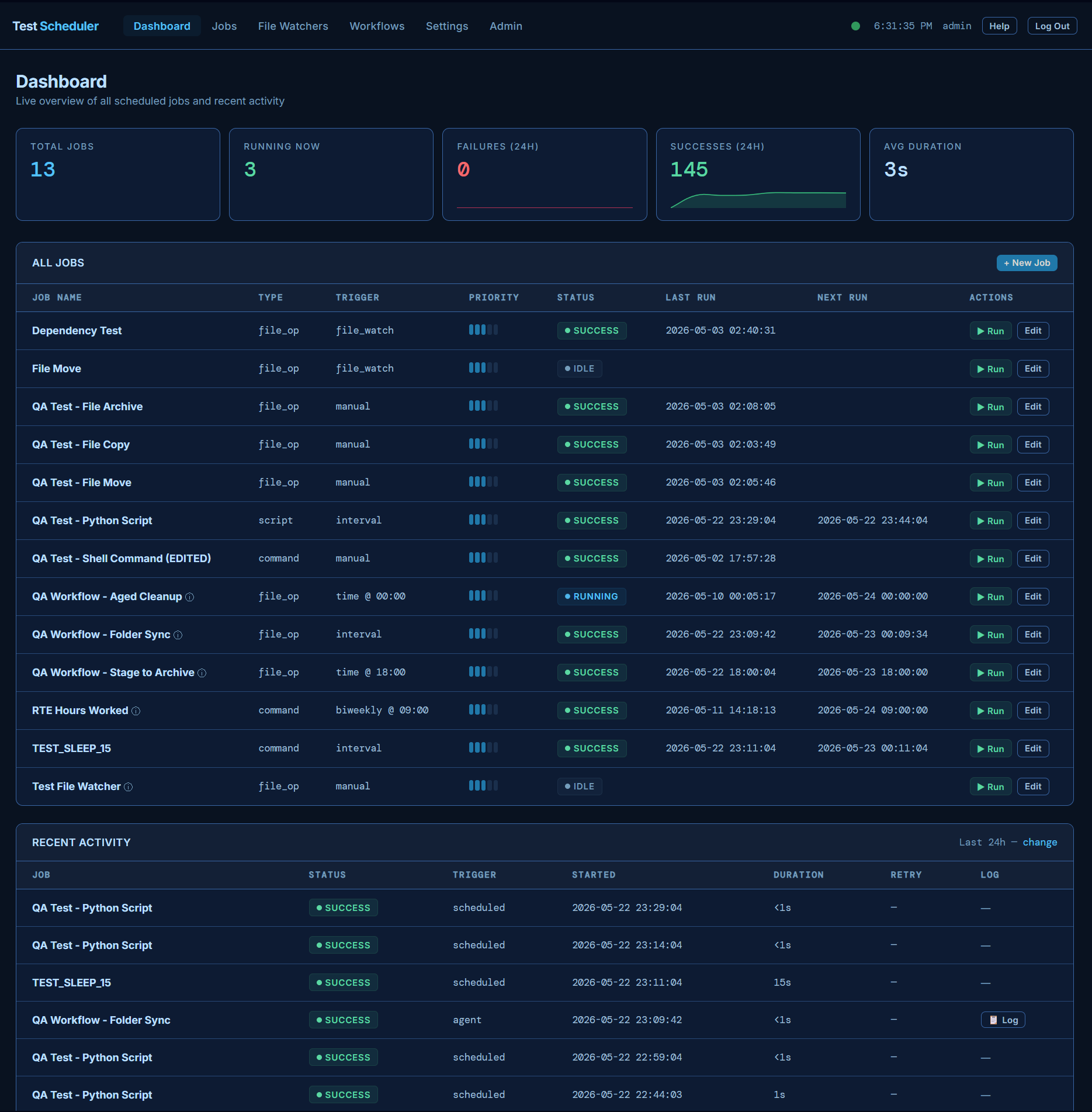
Suretek Scheduler dashboard showing job metrics and scheduled tasks
Free
$0/mo
5 scheduled tasks
1 local agent
Email support (48hr)
Start Free →
Pro
$69/mo
100 scheduled tasks
5 local agents
Priority support
Get Started →
Business
$199/mo
500 scheduled tasks
20 local agents
24/7 phone + Slack
Get Started →

No contracts. Cancel any time. Start on the free plan and upgrade when you need more.

Plain answers to the first things people ask.

Do I need to know anything about technology to set this up?
No. If you can describe what you want to stop doing manually, we can set it up. The wizard asks plain English questions — folder names, how often you want it to run, where things should go. No technical background needed.
What does "runs in the background" actually mean?
It means a small program runs quietly on your computer — you won't see it, it won't slow anything down, and you don't have to do anything to make it run. It just does its job on schedule and gets out of the way.
What if my computer is off when it's supposed to run?
It'll run the next time the computer is on and the scheduled time passes. For businesses that need guaranteed runs, we can talk about setting it up on a machine that stays on — like a server or a dedicated PC.
How much does it cost?
Suretek Scheduler runs on a monthly subscription — there's a free plan to start with no credit card needed. Paid plans start at $19/month. See the full plan breakdown in the pricing section above.
What if I need something that isn't one of the four options?
Those four cover what most businesses need, but they're not the limit. If you have a specific task in mind, reach out and describe it. We'll tell you straight whether we can automate it and what it would take.
Do my files get sent to Suretek or stored in the cloud?
No. Your files never leave your building. Suretek Scheduler runs directly on your own computers — it moves, copies, or deletes files between locations on your own network. We never see your files, never store them, and they never touch our servers. The only thing that connects to us is the scheduler agent, so we know your jobs ran.
Right now yes — the installer runs on Windows. If your business runs on Mac or a server, reach out and we'll figure out the right approach.

Pick your task.
Set your schedule.
Stop doing it yourself.

The wizard takes about five minutes. No account needed to start — just tell us what you want to automate and we'll take it from there.

Open the Wizard →